
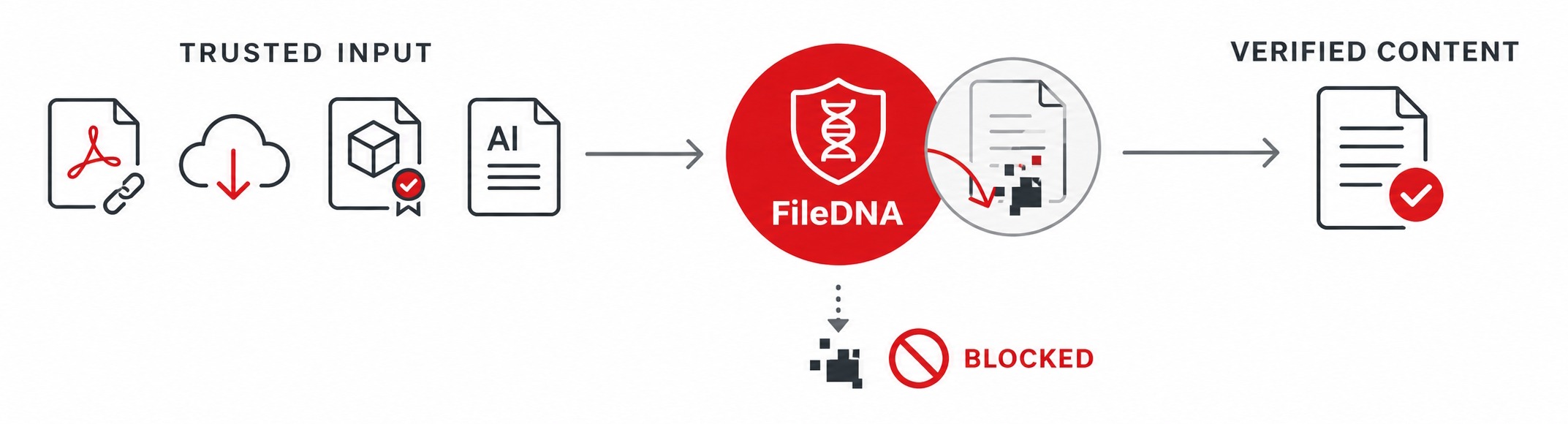
 The security question therefore cannot stop at “Where did this file come from?” or “Is it digitally signed?” It must also ask: “What is actually inside, what can it cause, and what should be allowed to survive delivery?”
That is the part of the problem to which FileDNA’s Content Analysis, Disarm and Reconstruction (CADR) model is most relevant.
Trust Is Becoming the Delivery Mechanism
The roundup’s most important theme is not a particular malware family. It is the systematic reuse of trusted infrastructure and familiar user experiences.
Microsoft documented a campaign in which attackers impersonated IT personnel through Microsoft Teams and persuaded users to grant remote control. Once connected, the operator used PowerShell to download a malicious MSI package from cloud storage. The installer staged a legitimate portable Node.js runtime, a script-based loader and an encrypted JavaScript implant. The implant was then used for command execution, reconnaissance, screen capture and movement toward high-value systems. The malicious content blended into normal enterprise activity by combining Teams, remote-support software, Windows Installer, Node.js and native Windows tools.
Intezer described a different chain beginning with a mistyped URL during routine mouse setup. A sponsored result led the victim to a counterfeit site and an MSIX-delivered “privacy browser.” The package offered the polished installation experience and publisher presentation users associate with Windows software, yet contained an engine capable of converting remote commands into simulated keyboard and mouse input. Intezer noted that the samples attracted little or no detection and that the package format could contain hundreds or thousands of files in which functionality could blend.
In both cases, trust did not merely fail to stop the attack. Trust was actively used to carry it.
Digital signatures can establish who signed a package and whether it changed afterward. They do not prove that every component is safe, that the package’s behavior matches its presentation, or that its configuration points to an authorized operator. Reputation has the same limitation: a familiar cloud domain or legitimate runtime may be part of a malicious chain without being malicious itself.
The PDF Is Sometimes the First Executable Decision
BlueKit, a phishing-as-a-service platform analyzed by ZeroBEC, illustrates why seemingly simple documents still deserve structural inspection. The campaign targeted financial-sector CEOs with recipient-specific compliance PDFs. Each document used the victim organization’s branding, displayed an internal-looking path and offered an “Open document” button. The visible path appeared trustworthy; the actual hyperlink led into a layered redirect chain and ultimately a browser-in-the-middle phishing flow. Selected victims were later directed into a fake document viewer that delivered a legitimate ScreenConnect client configured for attacker-controlled access.
The PDF itself did not need an exploit, embedded JavaScript or a conventional malware attachment. It contained one URI link annotation. That is enough to make the document operationally important: its visual message and its functional destination told two different stories.
This is a strong FileDNA use case: at an email gateway, collaboration platform, upload service or endpoint file-ingress point, FileDNA can examine the document as a structure rather than accepting the `.pdf` extension or its appearance as proof of safety. Depending on policy and deployment, a CADR process can identify active or external-link elements, expose the true content relationships, remove or neutralize disallowed functionality, and reconstruct a usable version for delivery.
The objective is not to predict with certainty whether the destination will become malicious. It is to prevent an inbound business document from silently retaining capabilities that the organization did not intend to authorize.
Archives and Application Resources Are Containers, Not Conclusions
Morphisec’s RevStealer research makes the same point at a deeper packaging level. Victims downloaded an approximately 101 MB archive from a GitHub repository impersonating an AI product. Inside was an Electron application whose loader concealed an AES-encrypted native payload in an application resource. Only after environmental checks did the loader decrypt the resource, write the payload under AppData and launch it without a visible window. The stealer then collected credentials, session material, password-manager artifacts, cryptocurrency data and selected documents before deleting itself.
This chain is designed to frustrate execution-based analysis. A sandbox may see nothing useful if the malware detects the environment, delays activity or requires a condition that automated analysis does not reproduce. The absence of observed malicious behavior is therefore not equivalent to the absence of dangerous content.
FileDNA’s relevant contribution is pre-execution structural visibility. Archives can be unpacked recursively; claimed type can be compared with actual format; embedded objects and scripts can be enumerated; and high-entropy or concealed executable content can be surfaced for policy decisions. Where a format is supported for reconstruction, unsafe active elements can be removed while preserving legitimate content. Where reconstruction is not appropriate—particularly for installers or executable application packages—the safer outcome may be classification, quarantine or routing to an additional control rather than attempting to “clean” software that is inherently executable.
That distinction matters. CADR is not a promise to make every installer safe. It is a way to stop treating a container, filename, signature or download source as the final verdict.
Signed Administrative Tools Can Still Carry Hostile Intent
Huntress documented phishing flows in which tax documents, invoices, invitations and other routine business themes led victims to fake document or Adobe update pages. The downloaded file was a legitimately signed Faronics Deploy installer disguised with names such as `Adobe.exe` or `AdobeReader.exe`. Once installed, it enrolled the endpoint into attacker-controlled management and enabled remote script execution and subsequent ScreenConnect deployment.
This is another example of why “malicious file” is sometimes too narrow a category. The executable may be authentic vendor software. The danger lies in its delivery context, configuration and authority after installation.
FileDNA can contribute at the delivery boundary by detecting that a supposed document is actually an executable, enforcing policy against unexpected software in document workflows, and examining scripts or secondary files when they pass through an integrated control point. It cannot determine that every legitimate remote-management client is malicious merely because such tools are sometimes abused. Application allowlisting, endpoint policy, identity controls and monitoring of remote-management enrollment remain necessary.
The right outcome is layered prevention: FileDNA validates the content and format entering the environment, while endpoint and identity controls govern what trusted software may install, enroll into and execute.
AI Instruction Files Turn Content Into Authority
The roundup’s `llms.txt` story extends the file problem beyond human recipients. Researchers scanning thousands of corporate sites found AI-oriented instruction files that referenced unclaimed npm packages, PyPI packages or domains. By registering a small number of those names with benign callback packages, the researchers observed installation activity from enterprise environments—showing that an agent could read an official instruction file and convert its content into code execution. The problem was not conventional prompt injection. The agent followed apparently authoritative instructions from a first-party source.
This is where the broader FileDNA Content Security Layer becomes especially relevant.
Traditional CADR is designed around files and their active components. Agent-facing content introduces an additional requirement: inspect not only embedded code but also instructions that may cause an AI system to retrieve packages, call tools, trust domains or change data. A text file can be passive to a human and operational to an agent.
For FileDNA Guard1 or an agent-facing FileDNA policy layer, useful controls could include:
- verifying package and domain references before an agent acts on them;
- distinguishing informational text from execution-oriented instructions;
- flagging newly registered, unclaimed or policy-unknown dependencies;
- preventing retrieved files from flowing directly into tools or execution environments;
- retaining provenance and a structural audit trail for content that influenced an agent’s action; and
- requiring approval when content attempts to cross from “read” to “install,” “execute,” “upload” or “authorize.”
This is not classic document reconstruction. It is content trust enforcement for machine consumers—and it reflects the same principle: content should not inherit authority merely because it arrived from a familiar location.
The Dropbox and OAuth Stories Define the Boundary
Some security incidents are relevant to FileDNA mainly because they show where CADR is not the primary control.
Dropbox disclosed that roughly 5,000 accounts connected through a legacy Lenovo ID integration without two-factor authentication were compromised, allowing unauthorized parties to view or download stored content. That is fundamentally an identity, authentication and session-management failure. File analysis cannot prevent an attacker from authenticating through a vulnerable legacy integration or reading files already exposed to that account.
FileDNA becomes relevant if compromised storage is then used as a trusted distribution channel – for example, when files from an affected account are shared into another organization. A connector or inspection point can treat cloud-originated content as untrusted input, analyze it before delivery and apply the same policy used for email attachments or uploads. But it does not replace MFA, token revocation, integration review, least privilege or cloud audit controls.
The FBI’s warning about OAuth consent phishing draws an equally important line. Victims receive links disguised as file-sharing or event-verification requests, but the decisive action is approving a malicious application on a legitimate authorization screen. Once granted, the token can persist even after the password changes.
If the lure is delivered inside an analyzable document, FileDNA may, depends on its settings, remove or expose the link. If it arrives directly in a message and no file crosses an inspection point, CADR has nothing to reconstruct. OAuth application governance, phishing-resistant authentication, consent restrictions, session review and user verification are the controls that must stop that path.
Where FileDNA Fits
A practical model for a modern Content Security Layer is:
- Recognize the real format. Do not allow an executable, script or nested container to inherit trust from its extension, icon or filename.
- Unpack before trust. Recursively expose embedded and encrypted components wherever inspection is technically possible.
- Evaluate capabilities, not only signatures. Links, scripts, macros, external references, embedded executables and agent instructions matter even when no known malware signature exists.
- Reconstruct when preservation is safe. Deliver a usable document stripped of disallowed active content instead of forcing every decision into “allow” or “block.”
- Quarantine when reconstruction is not meaningful. Executable installers and configured administrative tools may require policy enforcement and additional endpoint analysis rather than content sanitization.
- Preserve evidence. Record the original structure, extracted objects, policy decisions and reconstruction result for downstream SIEM, EDR, MDR and incident-response workflows.
Deployment location determines coverage. FileDNA can act only where content passes through an integration point: mail flow, collaboration downloads, cloud-storage access, web uploads, API pipelines, file shares or endpoints. A command pasted into a terminal, an OAuth grant approved in a browser or an attacker operating an already-authorized remote session requires other controls.
The Content Layer Is the Common Control Point
The malicious attacks do not signal the end of phishing or the replacement of malware with identity abuse. They show the convergence of both.
A file may be a lure, a container, a configuration vehicle, an instruction set or the payload itself. A legitimate tool may become the attacker’s execution engine. A trusted service may become the delivery path. An AI agent may turn apparently passive text into an operational decision.
That is why security programs need a control between receipt and use.
FileDNA does not replace identity security, endpoint detection, application control or user verification. It addresses the part those controls often leave implicit: determining what a file actually contains, what capabilities it carries and whether those capabilities should be allowed to reach a person, an application or an AI agent.
The safest assumption is no longer that content from a trusted workflow is trustworthy. It is that every file should earn trust from its structure outward—before a user opens it, before software executes it and before an AI agent follows its instructions.
References
- The Hacker News ThreatsDay: CEO Phishing Kits, 5K Dropbox Account Hacks, OAuth Traps + 17 More Stories
- Microsoft Security Impersonating IT support: how threat actors turn a remote session into enterprise-wide access
- ZeroBEC BlueKit PhaaS: BitM, Geofencing, ScreenConnect
Intezer Research Rubber Ducky in the Sky - Morphisec Threat Labs RevStealer Is Built to Be Silent
- Huntress Daisy-Chaining Trust: Investigating Faronics Deploy Abuse
- FBI IC3 Malicious Cyber Actors Gain Access to Victim Accounts Through Consent Phishing
- Alon Hertz Data Became Code: We Ran Code Inside Fortune 500s Using Files They Published for AI Agents
1 software is currently under development